SambaCry Exploitation: From Initial Access to C2 Persistence
A technical breakdown of exploiting CVE-2017-7494 (SambaCry) into a complete post-exploitation chain: path traversal, privilege escalation, staged delivery, C2 communication, and operator control.
Intro
Academic note: This project was a course-based research and implementation effort, not a live production intrusion. Everything was done in a controlled environment and documented for defensive learning.
Safety note: I'm keeping this at the architecture and analysis level. I'm not going to hand over a step-by-step exploit recipe or anything that would make the lab easier to reproduce.
Responsible disclosure: CVE-2017-7494 was disclosed in 2016 and patched in Samba 4.6.4 and later versions. This writeup covers a legacy vulnerability for educational purposes only, demonstrating fundamental exploitation techniques on well-patched systems.
This is a technical breakdown of CVE-2017-7494, better known as SambaCry: a path-handling issue in Samba where a user with access to a writable share can push the server into loading attacker-controlled code. On its own that's a one-bug demo. But chain it together with privilege escalation, staged payload delivery, persistence, C2 architecture, and log cleanup, and it becomes a complete intrusion pipeline. This writeup covers that full chain.
The first idea we tried
The first version of the project used a Bluetooth keyboard hijack built around the KNOB attack: exploit a Bluetooth pairing weakness to spoof a HID keyboard and drive the rest of the chain from there.
The code and notes for that path are in the milestone materials, including knob.py and the milestone 2 README. It worked, but the demo left a visible artifact: a short terminal flash on screen, about half a second, which was too noisy for a live demo.
We moved to the SambaCry route because it was easier to explain, easier to stage, and connected more directly to the C2 and exfil logic. Here's a clip of the popup moment that motivated the switch:
The environment we were targeting
The lab modeled an office-style internal network with a Samba file server and Linux endpoints connected to it.
- Samba server with a writable share
- Ubuntu-like Linux machines sharing files on the network
- authenticated access to a writable share
- local-only testing in a disposable lab environment
The goal wasn't to simulate a large corporate breach, but to show how a share-level trust issue becomes a full post-exploitation chain once the surrounding architecture supports it. The bug is one thing; the trust model around it is where the damage starts.
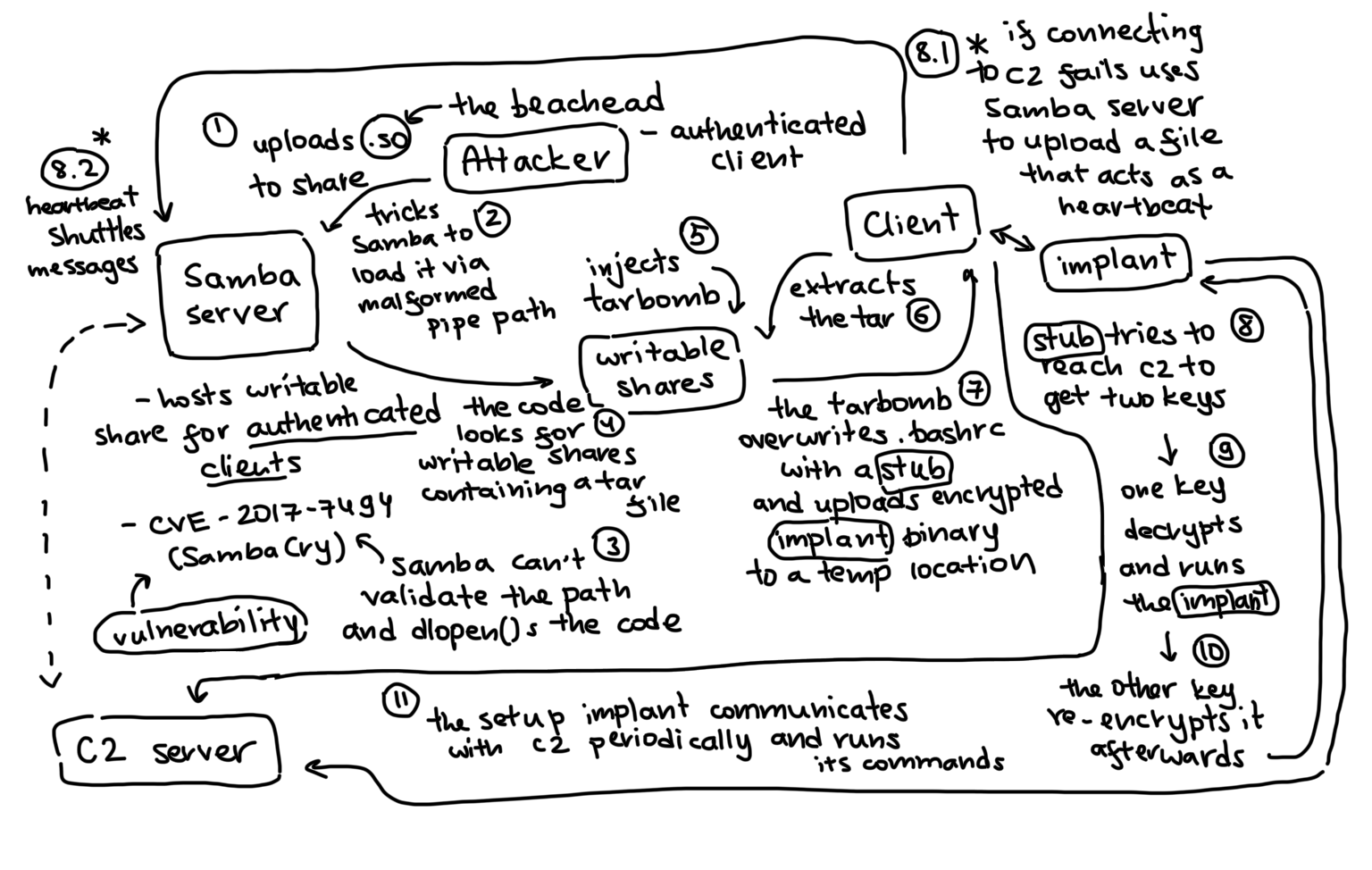
Understanding the Vulnerability
SambaCry is a path-handling flaw in Samba that lets an authenticated user with access to a writable share push the server into loading arbitrary code. Here's how it works and why it matters.
How SambaCry works, at the level that matters
SambaCry is a vulnerability in Samba's handling of Windows named pipe paths. A maliciously crafted path can cause Samba to follow a traversal to a file it shouldn't be loading, which eventually leads to dlopen() on an attacker-controlled shared library.
The effect matters more than the exact exploit syntax or shellcode details: a user with access to a writable share can trigger code execution with Samba's privileges. Samba often runs as a privileged service, so that execution is a meaningful foothold, not just another process.
Initial Exploitation & Access
Once the vulnerability is triggered, the attack moves beyond a one-off code execution and becomes a multi-stage delivery pipeline. This section covers the exploit chain: how the server becomes a staging platform, how payloads reach clients, and how the implant escalates privileges and hides.
The moment the exploit becomes infrastructure
Once the server is compromised, it becomes a staging platform. The server implant in sambatest.cpp scans for writable shares, looks for archive files, and injects malicious tar entries that abuse extraction behavior on the client side.
That's the tar-slip delivery mechanism. A tar archive is a trust boundary: it gets unpacked by a client, and if the archive contains relative paths or malicious overwrite entries, it can write into a startup script or a user-writable config path.
The project used that behavior to stage a follow-on payload on client machines, so the Samba server doesn't just pop a shell; it acts as a drop point for the next stage of the chain. One component creates the foothold, another turns that foothold into spread.
The malicious package and how it actually spreads
The staging flow lives in staging/stager.sh. Sequence:
- download the implant binary from a staging endpoint
- fetch a helper script or privilege escalation helper
- attempt to escalate privileges using a local privilege-escalation path
- if root succeeds, install the implant to
/usr/bin/dbus-sync - copy an init script into
/etc/init.d/ - create
/etc/rc*.dsymlinks so it runs on boot - launch the implant under a new process and scrub traces from shell history
Persistence uses a fake dbus-sync daemon, chosen to blend in with normal Linux service naming rather than stand out as a custom process name.
Cleanup steps:
- clears shell history
- removes temporary staging files
- tries to scrub obvious traces from logs and cron entries
- wipes the binary or startup scripts when instructed via the
DESTROYtask
This is what makes the implant operational rather than a proof of concept: the first payload has to survive, and it needs enough housekeeping logic to behave the way a real operator would expect.
Privilege escalation - the ptrace race condition
Once the stager runs and the implant is on a client machine, it needs to run with elevated privileges to stick around and do real damage. That's where the privilege escalation happens.
The project uses a vulnerability in the PTRACE_TRACEME system call. When a child process calls this function to trace its parent, there's a window where the kernel checks the parent's credentials. That window is a race condition: if the parent process's credentials change between the check and the actual enforcement, the child can end up traced by (and inheriting privileges from) a process it shouldn't have access to.
The exploit abuses this by coordinating the parent process to elevate its privileges right as the child is calling PTRACE_TRACEME. If timed right, the kernel's credential check passes, but the actual attachment happens after the parent has already elevated to root. The child then inherits that root context and can write files that persist across reboots.
It's not something you can brute-force; it requires the stager to coordinate the timing. But once it lands, the implant runs as root for the rest of the session. That's why the init.d script works: it's installed by a root process, so it survives and re-executes on boot.
Staying hidden - obfuscation and evasion
The implant binary is compiled from Python using PyInstaller and then stripped of symbols. To anyone doing a quick strings or objdump, it looks like compiled C, not a Python runtime. The binary gets installed to /usr/bin/dbus-sync, a name that blends in with legitimate D-Bus infrastructure. If someone runs ps aux, they see:
root 1234 0.1 0.2 45000 2100 ? Ss 10:02 0:00 /usr/bin/dbus-sync
Looks like a service. Could be anything.
The TLS handshake is spoofed: the certificate it presents claims to be from security.ubuntu.com (with org Canonical Ltd), so if someone does a quick cert check, it looks official. The traffic itself is encrypted, so packet inspection won't reveal payloads.
The C2 beacons run with 4–12 second random jitter, not a fixed interval. That defeats simple network signature detection that looks for heartbeat patterns. The implant sends very small bursts only when the operator issues a command; CPU and RAM usage stays under 0.1% and 1.5% respectively.
Network isolation is another trick: the implant only knows the redirector's IP (an nginx proxy). It never sees the actual C2 server directly. If the redirector gets burned or discovered, it gets swapped out without rebuilding the implant. The operator sits on localhost:9998 behind the redirector, completely hidden from the network side.
When the DESTROY command runs, the implant:
- wipes the
/usr/bin/dbus-syncbinary itself - removes the init.d script
- cleans the crontab
- scrubs bash history and syslog entries for any mention of "dbus-sync"
Afterwards, there's nothing in the obvious places that suggests it was ever there.
Post-Exploitation & Command & Control
With the implant installed and persistence in place, the attacker needs to manage it remotely. This section covers the implant architecture, how the operator controls it, the C2 network design, and how data exfiltration is handled through separate encrypted channels.
The implant itself
The client-side implant is implemented in modulepoc.cpp, with a Python reference version in implant_client.py. It does three jobs:
- silently establish a beacon to the C2 server
- accept commands from the operator
- exfiltrate sensitive files or credentials when told to do so
The implant beacons over TLS with jittered timing, a random interval between 4 and 12 seconds. The Python version opens a TLS socket to the C2 port 443, performs an RSA key exchange, and wraps command payloads with a layered encryption scheme built in helper.py:
- RSA-2048 ephemeral key exchange for session setup
- Fernet symmetric encryption for the actual message body
- XOR obfuscation before sending over the network
helper.py does the transformation: obfuscate() and deobfuscate() XOR-flip the payload with a fixed key, then base64 it and reverse it before transmission. The server decrypts it with the corresponding private key after deserializing the implant's public key.
How the operator actually handles the implant
The operator side is op.py. It connects to the C2 server with a token-based auth flow. Once authenticated, it can:
- list connected implants
- target a specific implant by ID
- send commands like
SYSINFO,RUN_CMD,RECON_BUNDLE,EXFIL_FILE,FIREFOX_EXFIL, orDESTROY
c2_server.py is a small control plane: it maintains a session registry, tracks implant metadata, and queues commands for each connected implant. When the implant responds, the operator gets a structured JSON result.
Operator console commands:
listtask <ID> RUN_CMD "..."task <ID> SYSINFOtask <ID> RECON_BUNDLEtask <ID> SHADOW_EXFILtask <ID> DESTROY
The commands map directly to what the implant supports in code, matching the built-in operator actions the README describes. The operator sends a task, the server queues it, the implant executes it, and the result comes back in a structured, chainable format: session tracking, operator auth, command dispatch, and payload handling in one place.
C2 network architecture - isolation and redirector hops
The C2 server doesn't sit on the internet. Instead, the operator connects to a local control interface on localhost:9998 with a token-based auth flow. That keeps the actual C2 totally isolated from the network.
Implants connect to a redirector (an nginx TCP stream proxy) on port 443, not directly to C2. The redirector forwards traffic to the actual C2 server on an internal port. This design means:
- the implant only ever knows the redirector's IP, not C2's
- if the redirector gets discovered or burned, swap it out without rebuilding every implant
- the redirector can be hosted separately, maybe on different infrastructure
- real traffic never touches the command center directly
The command channel uses one encryption stack: ephemeral RSA-2048 for key exchange, then Fernet (AES-128-CBC + HMAC-SHA256) for message bodies, then XOR obfuscation on top before transmission. No static keys anywhere.
How exfiltration was implemented
The implant reads a file from the target system and sends it to an external HTTP endpoint on a separate exfil channel:
- read the file
- XOR-byte rotate the data with a fixed rolling pattern
- base64 encode it
- send it to the exfil server with an
X-Enc:rxb64header
This is implemented in both implant_client.py and exfil_server.py. The exfil server receives a POST to /upload with a file name in the query string, decodes the rolling XOR transformation, writes it to a local exfil directory, and exposes a /files endpoint to retrieve it later.
Command traffic and exfil traffic run on separate channels (port 443 for commands, port 9443 for files) with different encryption schemes. The command channel uses the full RSA + Fernet + XOR stack. The exfil channel uses only rolling XOR + base64 with an X-Enc: rxb64 header to signal the encoding to the receiver.
This separation matters operationally: if the exfil channel gets detected or throttled, the C2 communication keeps working. Large file transfers don't clog the command queue. It's a compartmentalization pattern you'd see in real-world malware adapted for stealth.
Why the server-side mesh logic matters
One small but very interesting feature of the C++ server implant is the file-based routing logic in sambatest.cpp. The project defines multiple channels stored as files like:
smb.inismbclient.inismblib.ini
These act as queue-like communication paths between nodes. Jobs are encoded into these files with an XOR key (0x67), and the scheduler tracks client connectivity by reading and writing those channels.
This goes beyond a single exploit-plus-implant setup: it's a small mesh network in which compromised endpoints communicate through file-based relays. The implant can route jobs between infected nodes, promote some clients to gateway roles, and pass information along when not all machines can directly reach the command center.
With a gateway-like node and file-backed channels, the compromised hosts stop looking like isolated endpoints and start looking like a system with its own traffic patterns.
Detection & Defense
An attack chain this complex leaves traces at every stage. This section covers what defenders should look for: behavioral signals, forensic artifacts, and network patterns that reveal the full exploitation pipeline.
Why it can be traced and how a defender would look for it
A complete attack chain like this is traceable in a fairly straightforward way if you know what to look for. From a defender perspective, the signals are more specific than "a weird binary exists":
- suspicious outbound TLS connections to port 443
- repeated beaconing with jittered intervals
- startup scripts or rc symlinks creating
/usr/bin/dbus-sync curlandsuactivity in a low-privilege shell session during staging- archive extraction behavior writing to shell startup files or dotfiles
- exfil POST requests going to a separate port with encoded payloads
- service names that mimic legitimate system daemons
In a lab, the behavior can also be traced with tools like strace, ltrace, tcpdump, or a debugger attached to the process. The high-level forensic flow is to watch the process tree and observe:
- where the initial
curldownloads are happening - when the system writes to
/etc/init.dand/etc/rc*.d - when the process opens outbound sockets
- when a POST to the exfil endpoint begins carrying encoded file data
The behavior leaves a clear trail once you know the expected chain: each stage produces a distinct type of forensic evidence, from the file names and startup entries to the beacon ports.
From a network perspective, the traffic signature is all port 443 with TLS encryption, but the pattern is distinctive. The implant creates long idle gaps (4–12 seconds between beacons when dormant), then small bursts only when commands are issued. If you monitor for typical HTTPS usage, this sticks out: normal browser traffic is chatty and bursty; this is quiet and rhythmic. The CPU load stays nearly flat at 0.1% and RAM under 1.5%, so performance monitoring doesn't catch it either. But if you're watching for abnormal persistent outbound connections to a single destination on port 443, jittered timing, and minimal resource use, the implant becomes visible.
Full demo
Two longer recordings from the lab, for anyone who wants to see the chain actually run instead of just reading about it.
The first is the SambaCry exploit itself landing: the Metasploit is_known_pipename module uploading a payload to the writable share over and over via the named pipe until the server finally loads it and pops a shell.
The second is the C2 operator console in action: listing connected implants, running a full recon bundle, and pulling an exfil dump back through the server.
The bigger lesson
The exploit is only the start of the story. The real vulnerability is the trust architecture that makes the rest of the chain possible.
A writable Samba share becomes a real problem when it can deliver tainted archives, trigger persistence, and create stealthy client-side beacons. At that point it's no longer one bug, it's an internal infrastructure problem. SambaCry was the entry point; the network effect was the actual object of study.
References
- MITRE - CVE-2017-7494
- Samba Team - Security Advisories
- Project Github: https://github.com/Espiobest/cs564-project
- UMass CS564 Capstone Deck - Download PDF
On this page